Basketball scouting report template
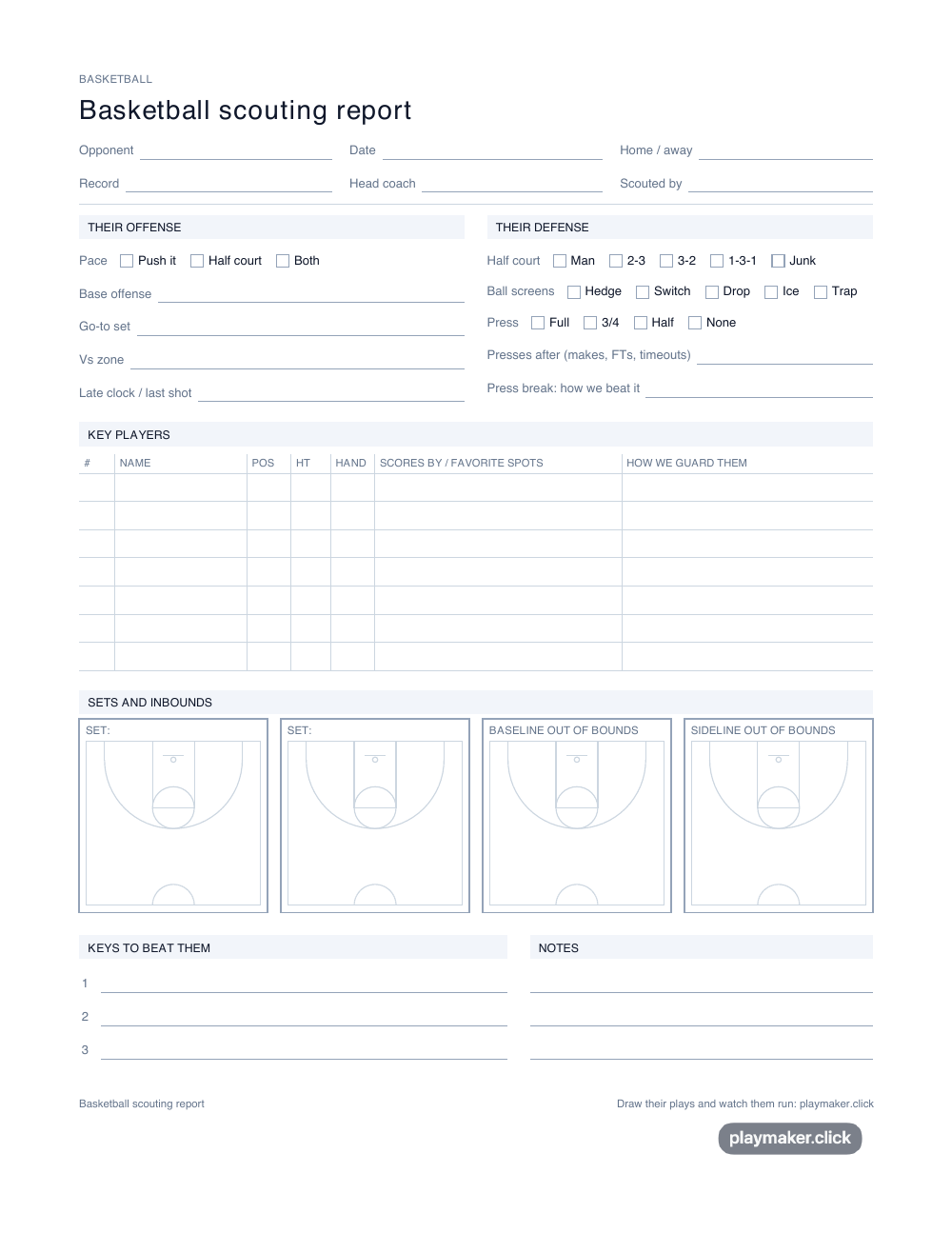
One printed page for scouting the team you play on Friday. Tick their defense and press, list the players who take the shots, and sketch their best sets and out-of-bounds plays on the half courts. Then draw those plays in Playmaker so your team sees them run.
Free, no account, nothing to install. Basketball scouting report, one page, US Letter. Draw their plays opens a basketball court in Playmaker, free and with no account.
How to use this template
Print one per opponent
Print at actual size on US Letter or A4. Take it to their game, or have it beside you while you watch film. Everything fits on one side, so it goes on a clipboard.
Tick what they run
Their pace, their half-court defense, how they guard ball screens and whether they press. Ticks are quick, so you can keep watching the game while you fill them in.
Name the players who matter
Seven rows for the players who take the shots and handle the ball, with their hand, their spots and how you plan to guard each one.
Sketch their sets and inbounds
Draw their go-to set and their baseline and sideline out-of-bounds plays on the half courts, as they happen. A rough sketch is enough.
Draw them for your team
Open Playmaker on a basketball court, draw the sets you sketched, and press play. Your scout team and your starters see the play move before the game, not for the first time in it.
Download the template
- Basketball scouting report, one pageUS Letter · PDF · 18 KB
- Basketball scouting report, one pageA4 · PDF · 18 KB
Found a play worth showing your team? Draw it in the a play creation tool built for coaches and press play to watch it run.
What goes on a basketball scouting report
A scouting report is not a record of everything the other team did. It is the handful of things your players need to know so nothing surprises them. For most high school and club teams that is four things: what they run when they have the ball, how they guard, how they get the ball in, and which two or three players you cannot let beat you.
This template is laid out in that order. The top half is ticks and short lines, so you can fill it in while the game goes on. The bottom half is for the things you need to see more than once: the players and the plays.
Their offense and their defense
On offense you note their pace, their base offense, the set they run when they need a basket, what they run against a zone and what they do with the last shot of a quarter. On defense you tick whether they play man, a 2-3, a 3-2, a 1-3-1 or a junk defense, how they guard a ball screen (hedge, switch, drop, ice or trap), and whether they press, how far up and after what. If they press after made baskets and free throws but not after timeouts, that is the line your point guard needs to hear. If they sit in a zone, the three plays against a 2-3 zone are a good place to start your plan.
Key players
Seven rows: number, name, position, height, which hand, how they score and where from, and how you will guard them. "Left hand only, goes right to pull up" is worth more to your defender than a points average. Most teams have two players who decide the game, so start there and add the rest if you have time.
Sets and inbounds
Four small half courts, drawn to scale with the lane and the three-point line, so a sketch lands roughly where the play really happens. Two are for their best half-court sets and two are for baseline and sideline out-of-bounds plays, which is where a lot of easy baskets come from in high school games. Our guide to inbound plays that work covers the common ones you are likely to see.
Draw their plays
Paper is fine for the scout. It is not good at showing a play to fifteen players. Open the basketball play designer, draw the set you sketched, and press play: every cut and screen runs in order, at the speed you choose, and you can send it to your team as a link. It is free and needs no account, and it is the same play creation tool coaches use for their own plays. If their set looks like one you already know, start from a ready template such as horns or the high pick and roll and move the two players they use differently. Sign in and you can save their plays into a playbook for that game: the free plan saves a few plays, and Pro saves as many as you draw.
Playmaker does not have a scouting feature. This sheet is the scouting part, and Playmaker is where the plays you find get drawn.
Common questions
What should be in a basketball scouting report?
Their offense and the set they run when they need a basket, their half-court defense and how they guard ball screens, whether and when they press, their out-of-bounds plays, and the two or three players who decide the game. Finish with three keys to beating them. This template has a place for each one.
How do you scout a basketball team?
Watch them once for the big picture, then a second time for detail. Tick their defense and press early, note who takes the shots, and sketch every out-of-bounds play and timeout set you see. Film helps, but one live game with this sheet is enough for most high school and club teams.
Is the basketball scouting report template free?
Yes. It is free to download and print, with no account and no email address. Each page has a small Playmaker mark at the foot.
Can I fill in the scouting report on my computer?
Not this sheet. It is made for a pen, because scouting happens in a gym. The plays you sketch on it can be drawn in Playmaker on a basketball court and shared with your team as a moving play, free.
Does it fit on one page?
Yes. It is one side of US Letter or A4, printed at actual size.
More free printable templates
- Football wristband template
- Flag football wristband template
- Football call sheet template
- Soccer practice plan template
- Basketball practice plan template
- Football practice plan template
- Netball practice plan template
- Volleyball practice plan template
- Rugby practice plan template
- Field hockey practice plan template
- Baseball practice plan template
- Volleyball rotation sheet
- Youth soccer rotation template
- Football scouting report template
- Soccer scouting report template
- Football scout card template
Show your team what you found
Draw the plays from your report in Playmaker and press play. Your players watch every run move before game day. Free, with no account.
Draw their playsPage updated · All templates