Free soccer play designer
A tactics board that plays the move back for you. Set your shape, drag the runs, add the passes, press play — then send your players a link that shows them the same thing on their phone.
Free forever, no signup, nothing to install.
The pitch you draw on is a real one
Playmaker draws the attacking half of a full-size soccer pitch — 68 m wide by 52.5 m deep — with the markings measured to the Laws of the Game rather than sketched: the 18-yard box, the 6-yard box, the penalty mark at 11 m, the penalty arc and centre circle both struck at 9.15 m, and the goal at 7.32 m between the posts.
That matters more than it sounds. A whiteboard's penalty area is whatever size the pen made it, so a "high line" drawn on one board and a "drop onto the edge of the box" drawn on another are the same distance apart. Here the distance between the edge of the box and the halfway line is the distance it is on Saturday, and a player looking at the diagram can find the place on the pitch it is describing.
What you can draw
- A shape. Tap to place your eleven, or start from a formation and move the two or three players you want somewhere else.
- Runs. Drag from a player and the path you draw becomes their run, timed across the play. A full back overlapping outside the winger is two drags.
- Passes. Switch to pass mode and tap the receiver — the ball travels to wherever that player is standing at that point in the move, so a pass into the space a runner is arriving in draws itself correctly.
- The finish. Mark who shoots and the ball is animated into the goal at the end.
- The opposition. A second team, drawn as squares rather than circles, so a press-and-cover picture, an offside trap or the shape you expect to face is on the same diagram as your own.
Everything is numbered automatically, and every play can be named, saved, exported as a PNG or printed as a play card for a match-day folder.
Set pieces, drawn to the marks
Corners and free kicks are the plays most worth writing down — they are rehearsed, they repeat, and they are where a great many grassroots soccer goals come from. They are also the plays a whiteboard is worst at, because a corner routine is six people moving at different times and a still diagram shows one moment of it.
Draw the near-post run, the far-post run, the target on the penalty spot, the short option and the three you hold back for rest defence, then press play and watch whether the near-post runner actually clears the space before the delivery arrives. The attacking and zonal-defending corner set-ups below are both drawn against a full opposition, so you can start from a real picture instead of an empty box.
Share it the way your players actually read things
A soccer play lives in its own link. Copy it into the team's group chat and a player opens it on their phone, presses play and watches the move — no app, no account, no PDF that arrives sideways. Pinch to zoom in on the crowded near post if they need to.
That is usually the difference between a session plan that gets read and one that gets scrolled past. It is also why the whole designer works without signing up: the coach who wants to draw one corner routine at 9pm on a Thursday should not have to make an account first.
7 soccer templates, ready to draw on
Every one of these opens from the Formations button inside the designer. Load it, move the players your team does differently, and draw the runs from there.
3-5-2
Formation
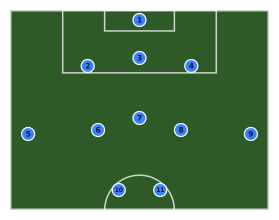
Three centre backs, wing backs pushed high and wide onto the touchlines, a midfield three inside them and a front two. Overloads the middle and asks the wing backs to cover the whole flank.
4-2-3-1
Formation
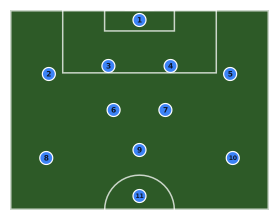
Back four, a double pivot screening in front of them, three attacking midfielders and a lone striker. The modern default: solid through the middle with a number ten between the lines.
4-3-3
Formation
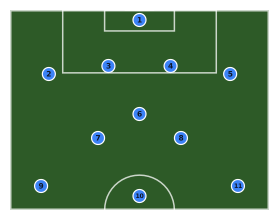
Back four, a single pivot with two eights ahead of them, and a front three holding the width. The wingers sit on the touchlines so the full backs have the space to overlap.
4-4-2
Formation
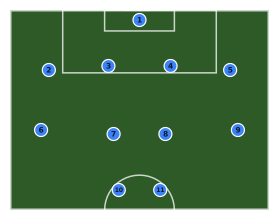
The classic two banks of four with a front pair. Drawn as a mid block defending the goal at the top: back four on the edge of the penalty area, midfield four across the middle third, strikers up on the halfway line.
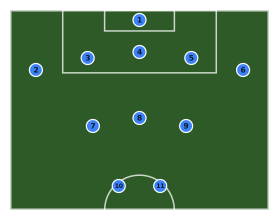
5-3-2 low block
Defence
A back five dropped onto the edge of the six-yard box with a midfield three in front and two strikers held back for the counter. What you set up when you are protecting a lead.
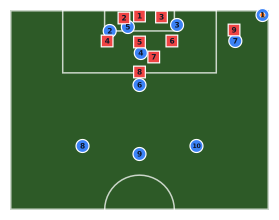
Attacking corner (right)
Set piece
A right-side corner: taker on the flag, runners at the near and far post, a target on the penalty spot, a short-corner option and three held back for rest defence. Ten outfield players — the keeper is in the other half, off screen. The nine defenders show a zonal set-up to attack against.
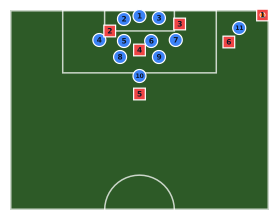
Defending a corner (zonal)
Set piece
Zonal corner defence: keeper on his line, bodies on both posts, four across the six-yard line, two on the penalty spot, one on the edge of the box and one out to press the taker. All eleven of ours, against six attackers.
14 soccer plays to watch and remix
Famous plays and plays published by coaches, each drawn in this designer. Watch any one animate, then remix it for your team.
Browse soccer playsSoccer play designer: common questions
Is the soccer play designer free?
Yes. Drawing, animating and sharing soccer plays is free and unlimited, and you do not need an account to start. A free account keeps three saved plays in your playbook; the paid plan raises that limit and removes the watermark from exports, but nothing about drawing a play is behind it.
Can I use it for football rather than soccer?
It is the same game and the same tool — we call it soccer because that is what most people searching for a play designer type. The pitch, the markings and the formations are association football, drawn to the Laws of the Game.
Which formations does it come with?
Seven soccer templates ship with it: 4-4-2, 4-3-3, 4-2-3-1, 3-5-2, a 5-3-2 low block, an attacking corner and a zonal corner defence. Each one is a starting picture, not a finished play — load it, then move the players and draw the runs you actually want.
Does it animate the runs and the passes?
Yes. Every run you draw is timed across the play and the ball travels between players in the order you added the passes, finishing with a shot if you mark one. You can replay it at different speeds, which is what turns a static diagram into something a fourteen-year-old will watch twice.
Can I draw the opposition as well as my own team?
Yes — a second team of players, drawn as squares so the two are never confused on a printout. Most useful for pressing traps, defending set pieces and showing a back four where the space behind them is going to be.
Does it work on a phone at training?
Yes. The pitch fills the screen, the drawing tools are within a thumb's reach and you can pinch to zoom without disturbing the play. Plays you have saved are on every device you sign in on.
Coach another sport?
The same designer draws every one of them — and plenty of PE departments need two or three.
Draw your first soccer play now
It opens on the soccer pitch, it costs nothing, and your team can watch the play animate from a link.
Open the designerPage updated · What Playmaker is