Basketball player evaluation form template
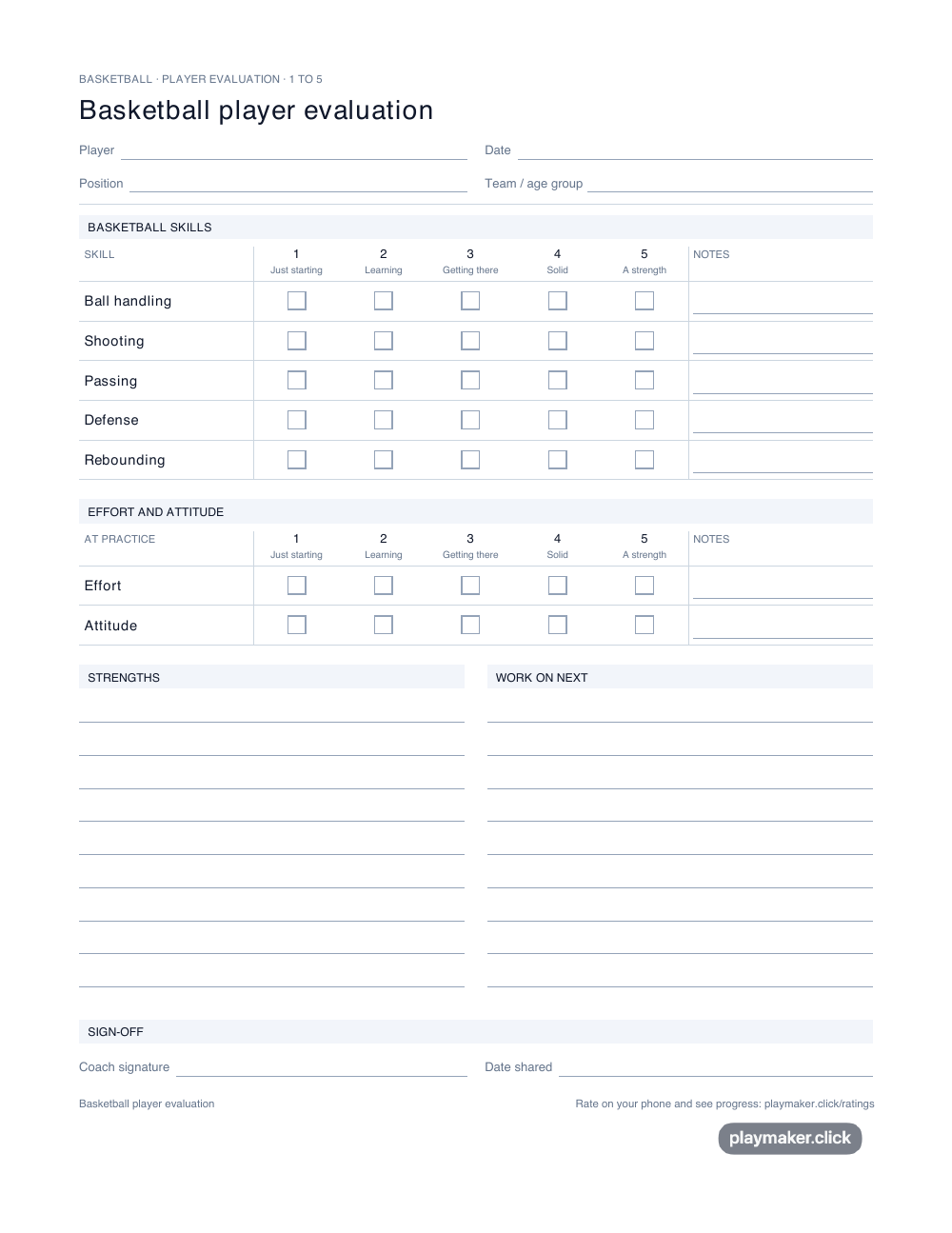
A one-page basketball player evaluation form to print and fill in by hand. Rate five basketball skills from 1 to 5, with what each number means printed on the form, then effort and attitude, a few lines on strengths and what to work on next, and a line to sign. Use one per player at the start, middle and end of the season.
Free, no account, nothing to install. Basketball player evaluation form, US Letter. Rating on your phone and seeing progress across the season is Pro, with a free trial.
What the form rates
Five skills, each scored 1 to 5, the same five player ratings in Playmaker use. Effort and attitude are on the paper form as well.
- Ball handling
- Shooting
- Passing
- Defense
- Rebounding
- 1
- Just starting
- 2
- Learning
- 3
- Getting there
- 4
- Solid
- 5
- A strength
How to use this template
Print one per player
Print at actual size on US Letter or A4. Fill in the player's name, position and the date before tip-off or the start of practice.
Score after a full session
Watch a whole practice or a game, then tick one box from 1 to 5 for each skill. The words under each number say what it means, so your assistant coach scores the same way you do.
Score effort and attitude separately
A player who sprints back on defense and talks on every screen deserves to hear it, even while their jump shot is still a 2.
Write one strength and one next step
Keep it to something a player can practise on their own driveway: weak-hand layups, a box-out on every shot, a pass fake before the pass.
Repeat it mid-season and at the end
Three forms a season, start, middle and end, are enough to see real progress. File each player's forms together.
Go through it with the player and the parents
Five minutes, strength first, then the next step. Sign it and hand them a copy.
Download the template
- Basketball player evaluation formUS Letter · PDF · 12 KB
- Basketball player evaluation formA4 · PDF · 12 KB
Pro: rate the same skills on your phone, keep every assessment, and see each player's progress across the season. Ratings use a squad you already saved, for example in the fair playing time rotation maker. This paper form stays free. What Pro adds
What to rate on a basketball player evaluation
Rate the skills a player uses on every possession, at both ends of the floor. This form rates five, the same five that player ratings in Playmaker use, so a paper form and the app agree:
- Ball handling: with either hand, with their head up, and under pressure.
- Shooting: form, footwork into the shot, and layups off both feet.
- Passing: seeing the open player, and the right pass, chest, bounce or overhead.
- Defense: stance, staying in front, help position and closing out without fouling.
- Rebounding: finding a body to box out, and going to get the ball at its highest point.
Each one is scored from 1 to 5, and the form prints what each number means: 1 is just starting, 2 is learning, 3 is getting there, 4 is solid and 5 is a strength. With the meaning written down, two coaches give the same player the same score, and a 3 in the first week means the same as a 3 at the end of the season.
Effort and attitude have their own rows under the skills, because they are the part of the game a player controls today. Keeping them apart from the skills means a hard worker still learning to shoot hears both halves. Those two rows are on the paper form only; the app rates the five basketball skills.
How often to evaluate players
Three times a season suits most youth and school teams: after the first week or two of practice, at the midpoint, and after the last game. Score more often than that and nothing moves, which teaches a player nothing. Keep the three forms together so you and the player can see the change.
How to talk to parents about it
Keep it to five minutes and start with the strength. Show the form, name one thing the player does well and one thing to work on next, and give them a drill they can do at home. Compare the player with their own last form, never with a teammate. A 2 is not a fail; it means learning, and saying that out loud helps. Sign it, date it and give the family a copy.
Rating on your phone instead
The paper form is free and stays free. If you would rather keep it on your phone, Pro rates the same five skills in a couple of minutes per squad, keeps every assessment, and shows each player's progress from one assessment to the next, skill by skill. Ratings work from a squad you already keep, such as one saved in the rotation maker, so there is nothing to type twice, and you can try Pro free before paying. See what Pro adds. Deciding what to work on next? The basketball drills library has a drill for every skill on the form, and the basketball practice plan template puts it into a timed practice.
Common questions
What should a basketball player evaluation form include?
The player's name, position and the date, a handful of core skills scored on the same scale, effort and attitude, one strength and one thing to work on next, and the coach's signature. This form rates ball handling, shooting, passing, defense and rebounding from 1 to 5.
How do you evaluate a youth basketball player?
Watch a whole practice or a game before scoring, rate each skill against the words under the number rather than against the best player on the roster, and write down one strength and one next step. Compare each player with their own last form.
How often should basketball players be evaluated?
Three times a season is enough for most youth and school teams: at the start, at the midpoint and at the end. Often enough to show progress, and far enough apart for the scores to move.
Is the basketball player evaluation form free?
Yes. Download and print it as often as you like, with no account and no email address. It carries a small Playmaker mark at the foot of the page.
Can I do player evaluations on my phone?
Yes, with Pro. Player ratings in Playmaker score the same five basketball skills on the same 1 to 5 scale on your phone, and show each player's progress across the season. You can try Pro free first. The printable form stays free either way.
More free printable templates
- Football wristband template
- Flag football wristband template
- Football call sheet template
- Soccer practice plan template
- Basketball practice plan template
- Football practice plan template
- Netball practice plan template
- Volleyball practice plan template
- Rugby practice plan template
- Field hockey practice plan template
- Baseball practice plan template
- Volleyball rotation sheet
- Youth soccer rotation template
- Basketball scouting report template
- Football scouting report template
- Soccer scouting report template
- Football scout card template
- Volleyball scouting report template
- Netball scouting report template
- Rugby scouting report template
- Field hockey scouting report template
- Baseball scouting report template
- Free flag football playbook
- Free basketball playbook
- Free soccer playbook
- Free rugby playbook
- Soccer player evaluation form
See each player's progress across the season
With Pro, rate your squad on these skills on your phone in a couple of minutes, and each player gets a page showing how they have come on since the last time. Try Pro free, with no card. The paper form stays free.
Rate on your phone (Pro)Page updated · All templates